Documentation menu
AK FlowBook for NinjaTrader 8 (v5.6): Overview
AK FlowBook is an order-flow indicator for NinjaTrader 8. It shows who traded aggressively, how large the orders were and what the order book looked like, on the same chart as your candles and key levels. We build and test it on COMEX gold futures (GC and MGC).
AK FlowBook is an analysis and education tool. It shows what happened in the market. It does not place orders, and it does not tell you when to buy or sell.
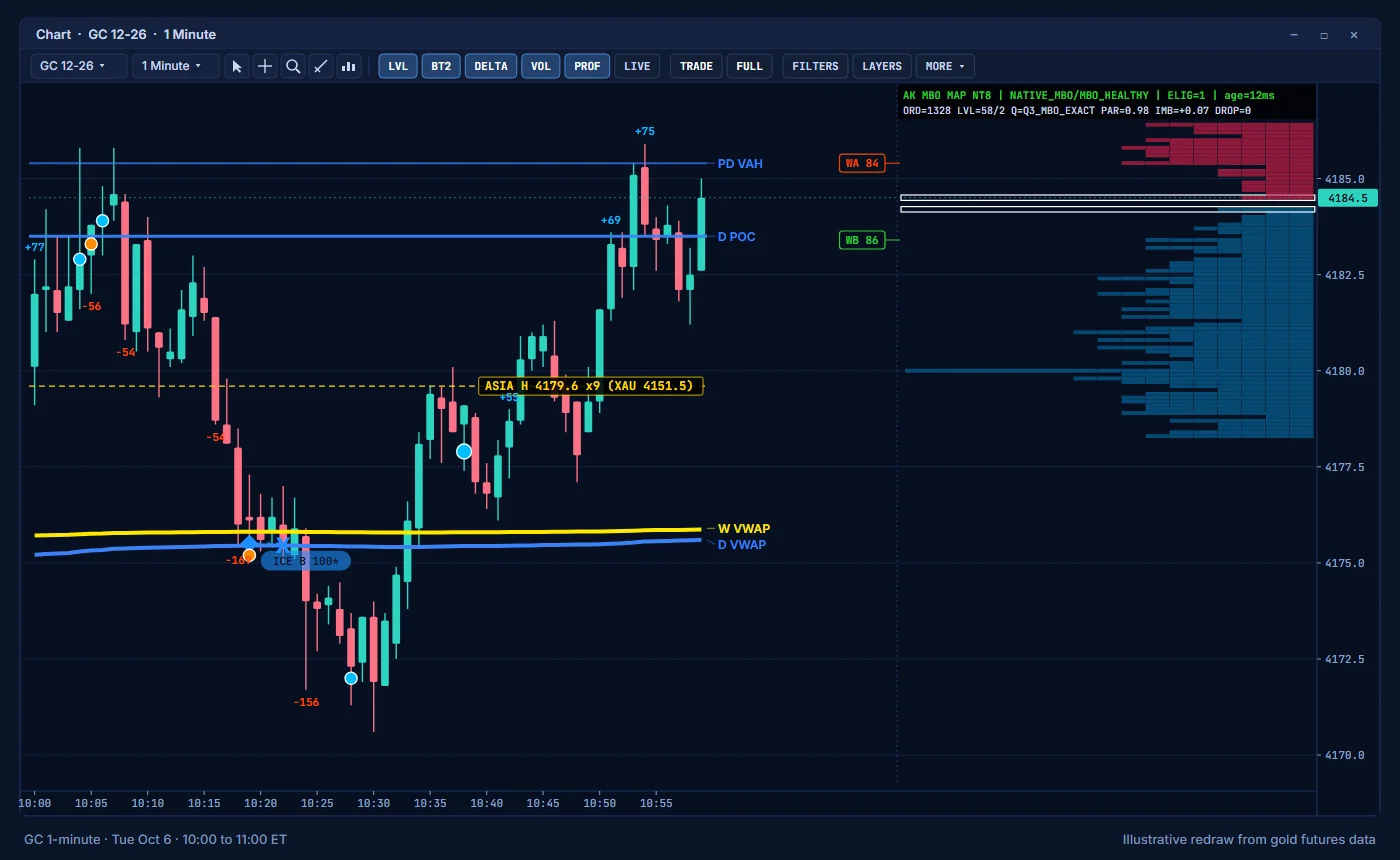
What you see on the chart
| Part | What it shows | Read more |
|---|---|---|
| Delta | Aggressive buying minus aggressive selling for each candle: +123 in blue above the high, -123 in orange-red below the low. | Delta |
| Big trades | Large aggressive orders rebuilt from their individual prints, drawn as a box with the size. Smart roles describe what price did next. | Big trades |
| BT2 dots | Single aggressive orders, drawn as dots that grow with size. | Big trades |
| Icebergs | Prices where a resting order kept refilling while it traded, with its side and size. | Icebergs |
| Levels | Daily, weekly and monthly POC, VAH and VAL, previous and naked levels, HVN and LVN, and VWAPs with ±1σ and ±2σ bands. | Levels |
| Session levels | Asia, London, overnight and New York highs and lows, the prior day and the prior New York session, with touch counts and an XAUUSD equivalent. | Session levels |
| Candle volume filters | Prices inside each candle with significant aggressive volume, in five color tiers. | Volume filters |
| MBO Price Map | The resting orders at each price, split into individual orders when order-by-order data is available. | MBO Price Map |
| Market context panel | A compact summary: data health, auction state, location, flow, MBO balance, initial balance, value migration and the 15-minute picture. | Context panel |
| Event labels | Short codes such as REJ, ABS or TRAP when order flow does something specific near a level. | Events |
| Info line | Activity, spread, order-flow imbalance, basis and news timing, plus the roll banner. | Info line |
| Alerts | Optional sounds for a large candle delta and for strong candle volume. | Alerts |
Who it is for
- Futures traders on NinjaTrader 8 who want to see order flow at the levels they already watch.
- XAUUSD (CFD) traders who want context from gold futures, where exchange volume and the order book are visible. See Using futures levels as a CFD trader.
- Traders who are learning order flow. Every part of the chart has its own page that explains what it shows and how to read it.
AK FlowBook is not an automated trading system, and it does not give buy or sell signals.
Requirements at a glance
| Item | What you need |
|---|---|
| Platform | NinjaTrader 8, version 8.1.7 or later, on Windows |
| Chart | GC (gold futures), 1-minute |
| Order-by-order data | A Rithmic connection in NinjaTrader. Without it, the map uses Level 2 data. |
| Volumetric history | NinjaTrader Order Flow+ (recommended) |
| Tick Replay | Optional |
Full details are on the Requirements page.
Instruments
Presets are included for GC, MGC, ES, MES, NQ, MNQ and CL, plus Auto and Custom. Gold is the instrument we test and support first.
Where to start
- Check the requirements.
- Install AK FlowBook and add it to a chart.
- Follow the quick start for your first five minutes.
- Learn the toolbar.
- Read the guides, starting with Reading absorption.
Education only. Not financial advice. Trading futures and CFDs carries a high risk of loss.