Documentation menu
Delta: aggressive buying minus selling per candle
Delta is the aggressive buy volume minus the aggressive sell volume of one candle. A trade is aggressive when it crosses the spread: a buyer who lifts the ask, or a seller who hits the bid. Delta shows which side was in a hurry during that candle.
For example, if 120 lots were bought at the ask and 65 lots were sold at the bid, delta is +55.
What you see
- Positive delta prints as
+123in light blue, a few ticks above the candle high. - Negative delta prints as
-123in orange-red, a few ticks below the candle low. - The forming candle shows its delta live. The number updates until the candle closes, then it is fixed.
- Only notable candles get a label. A candle gets a number when its delta, positive or negative, reaches the Minimum Delta setting. The GC default is 50 lots.
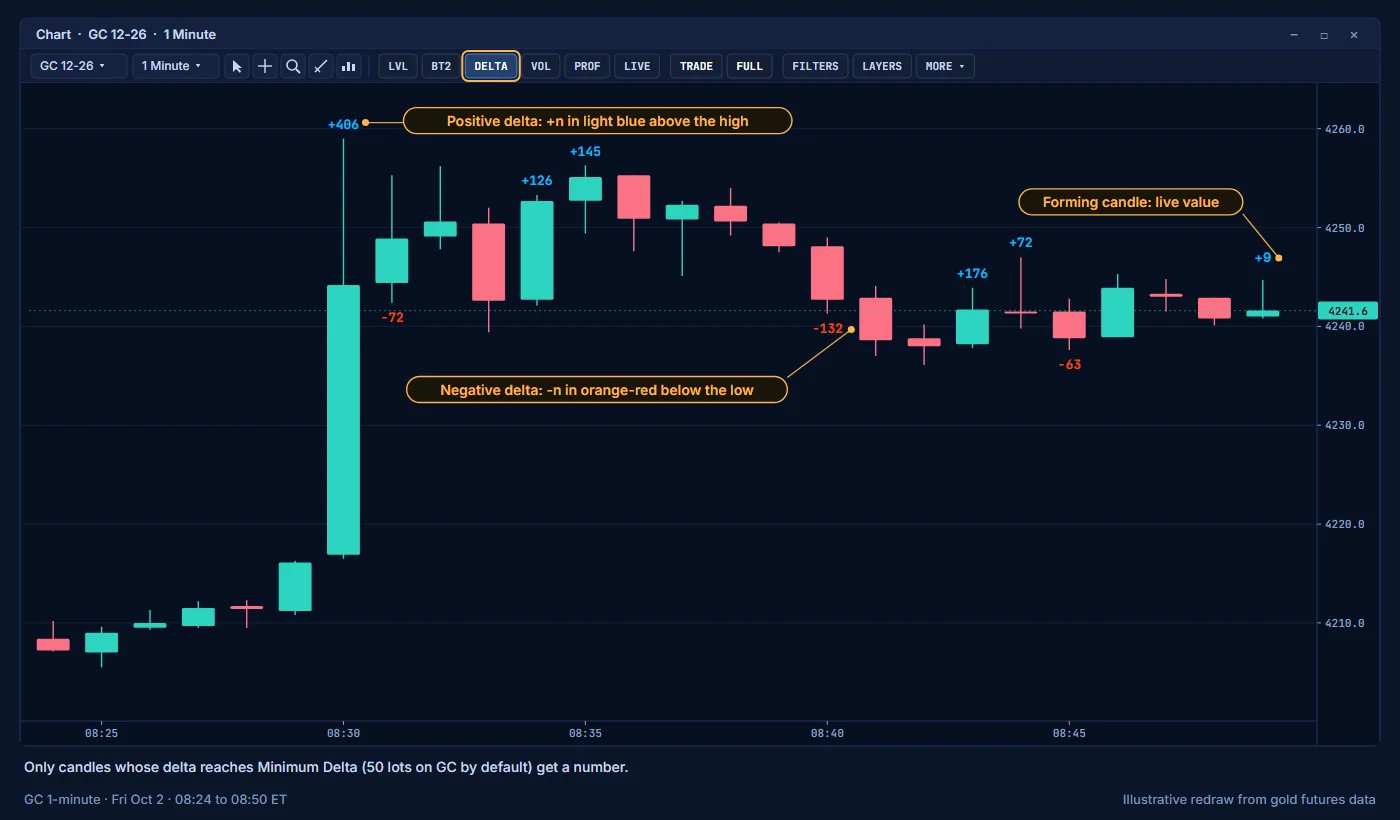
Turn the layer on or off with DELTA on the toolbar.
How to read it
Delta is effort. Price movement is the result. Compare the two.
| Delta | What price did | What it suggests |
|---|---|---|
| Large positive | Moved up and closed near the high | Buyers pushed and price followed. |
| Large positive | Barely moved, or closed lower | Aggressive buying met passive sellers. This is absorption. |
| Large negative | Moved down and closed near the low | Sellers pushed and price followed. |
| Large negative | Barely moved, or closed higher | Aggressive selling met passive buyers. This is absorption. |
Delta shows who was aggressive, not who was right. Read it together with location: a large delta at a value edge or a session high says more than the same number in the middle of a range. The guide Reading absorption shows how to combine delta with the other layers.
Delta ladder (DL)
You may also see DL labels, for example DL 3/85. DL stands for delta ladder: several prices in a row inside the candle with strong delta on the same side. The first number is how many prices, the second is a strength score. Buy-side DL labels print below the candle, sell-side labels above it. They belong to the DELTA layer and follow Show Delta Ladder in group 01A. See Events.
Settings
| Setting | Group | Default |
|---|---|---|
| Delta numbers | 00 Chart View | On |
| Live delta on the forming candle | 00 Chart View | On |
| Show Delta Numbers | 01 Events & Delta | On |
| Minimum Delta | 01 Events & Delta | 50 (GC recommended) |
| Delta Sound Alert (Optional) | 01 Events & Delta | On |
You can also raise the minimum for labels in the FILTERS window. A value of 0 uses the Minimum Delta setting. A value below that setting only changes the live number on the forming candle, because closed candles below the setting never get a label. This filter changes the display only.
Data
On historical bars, AK FlowBook builds delta from NinjaTrader volumetric data (see Requirements). On live bars, it builds delta from the trades as they print.
Related
- Alerts: get a sound when a live candle's delta is large.
- Candle volume filters: see where inside the candle the aggressive volume traded.
Education only. Not financial advice. Trading futures and CFDs carries a high risk of loss.