Documentation menu
Order-flow event labels: what each code means
Where they appearThe codesEvent SensitivityNear levels onlyHow to read themAdvanced tuning
Event labels are short codes that AK FlowBook prints when order flow does something specific: a rejection, a sweep, absorption and more. They turn a busy tape into a few readable moments. Read them as observations of what happened and where, not as instructions.
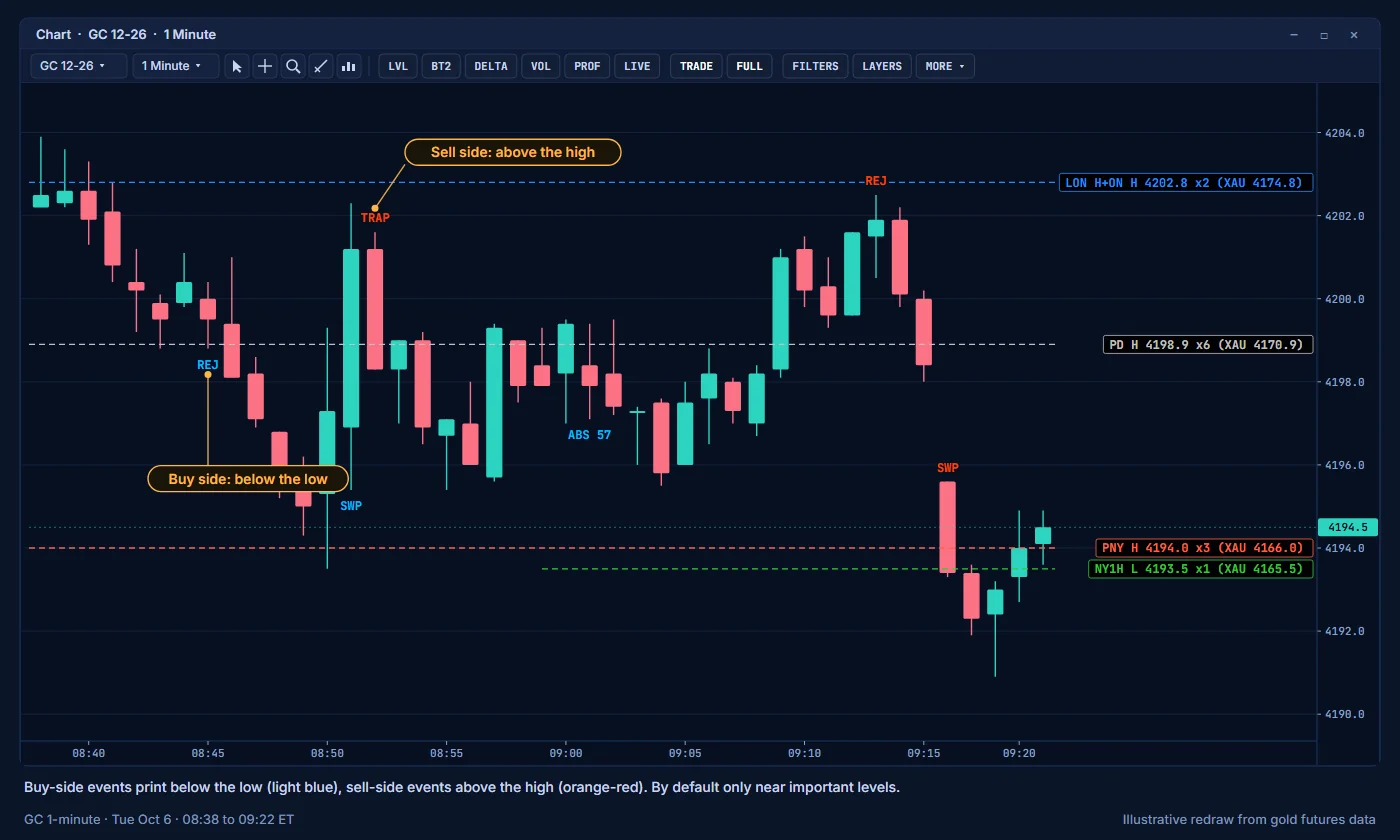
Where they appear
- Buy-side events print below the candle low. Sell-side events print above the candle high.
- Each label is a code, sometimes with a value, for example
ABS 120. - By default, events print only near important levels, such as value edges, VWAPs, naked levels and session highs and lows. Away from levels, order-flow events carry less context, so AK FlowBook leaves them out.
Event labels are off in the TRADE view, which is also the starting view. To show them, turn on Event labels in the 00 Chart View settings group and keep Show Important Order-Flow & MBO Events (group 01 Events & Delta) on. If you already used the toolbar on this chart, the saved toolbar state is used instead; see the note in Settings.
The codes
| Code | Name | What it describes | Default |
|---|---|---|---|
REJ | Rejection | Price probed a level and was pushed back. | On |
SWP | Sweep | Price ran through a level, taking the resting orders beyond it. | On |
ABS | Absorption | Heavy aggressive volume met passive orders, and price barely moved. | On |
AF | Aggression failure | The aggressive side pushed, but price did not follow. | On |
DL | Delta ladder | Several prices in a row inside the candle with strong delta on the same side. DL labels are drawn with the DELTA layer. | On |
IMB | Diagonal imbalance | One side clearly outweighed the other when buys and sells are compared diagonally across prices. | On |
CVD | CVD divergence | Cumulative delta and price disagree: one makes a new extreme and the other does not. | On |
EXH | Exhaustion | Aggression faded at the end of a move. | On |
TRAP | Trap | Aggressive traders pushed beyond a level and price came back against them. | On |
TS | Tape sweep | A fast burst of aggressive trades through several prices. | Off |
ICE | Iceberg | An iceberg was detected at this price. | Off |
VAC | Vacuum | Very little resting liquidity, so price can move through easily. | Off |
PS | Pull / stack | Resting orders were pulled from, or stacked into, the book. | Off |
Switch each code on or off in the 01A Event Controls group. See Settings.
Event Sensitivity
Event Sensitivity (group 00 General) sets how selective AK FlowBook is:
| Value | Effect |
|---|---|
| 0 Strict | Fewer labels. Only the clearest events. |
| 1 Balanced | The default. Recommended. |
| 2 High Recall | More labels. Includes weaker events. |
Event Detail in group 01 Events & Delta is also set to 1 Balanced by default. Its options are 0 Clean, 1 Balanced and 2 Detailed.
Near levels only
Events Only Near Important Levels (group 01A Event Controls) is on by default. Turn it off to see events anywhere on the chart. Expect many more labels.
How to read them
- Start with location. An
ABSat the weekly VAL is a different story from anABSin the middle of the range. - Look for agreement between layers. An
ABSlabel, aFAILbig trade and an iceberg at the same price describe the same thing from three angles. - Labels describe the past. What price does next is what matters.
The guide Reading absorption shows event labels together with the other layers.
Advanced tuning
Advanced users can adjust how events are detected in the 01B Event Score Overrides and 07 Manual Thresholds groups. Use Manual Event Scores is off by default. We recommend the defaults with Use Preset Thresholds on.
Education only. Not financial advice. Trading futures and CFDs carries a high risk of loss.