Documentation menu
AK FlowBook for NinjaTrader 8Getting startedAK FlowBook for NinjaTrader 8 (v5.6): OverviewRequirements: platform, data feed and market dataInstall AK FlowBook in NinjaTrader 8Quick start: your first 5 minutesThe FlowBook toolbar: every button explainedChart componentsDelta: aggressive buying minus selling per candleBig trades, Smart roles and BT2 single ordersIcebergs: hidden size that keeps refillingLevels: volume profile, naked levels and VWAPsSession levels: Asia, London, overnight and New YorkCandle volume filters: five tiers inside each candleMBO Price Map: the order book, order by orderMarket context panel: what each row meansOrder-flow event labels: what each code meansInfo line, banners and data healthAlerts: delta and candle volumeSettingsSettings referenceGuidesGuide: reading absorption with AK FlowBookGuide: watching price at HVN and LVN levelsGuide: session highs and lows as levels to watchGuide: using futures levels as a XAUUSD CFD traderHelpTroubleshootingFrequently asked questions
Docs › NinjaTrader 8 › Chart components
Candle volume filters: five tiers inside each candle
A candle shows where price opened, closed and traveled. It does not show where the volume traded. The candle volume filters open the candle up: they mark the prices inside it where aggressive volume was significant, without a full footprint chart.
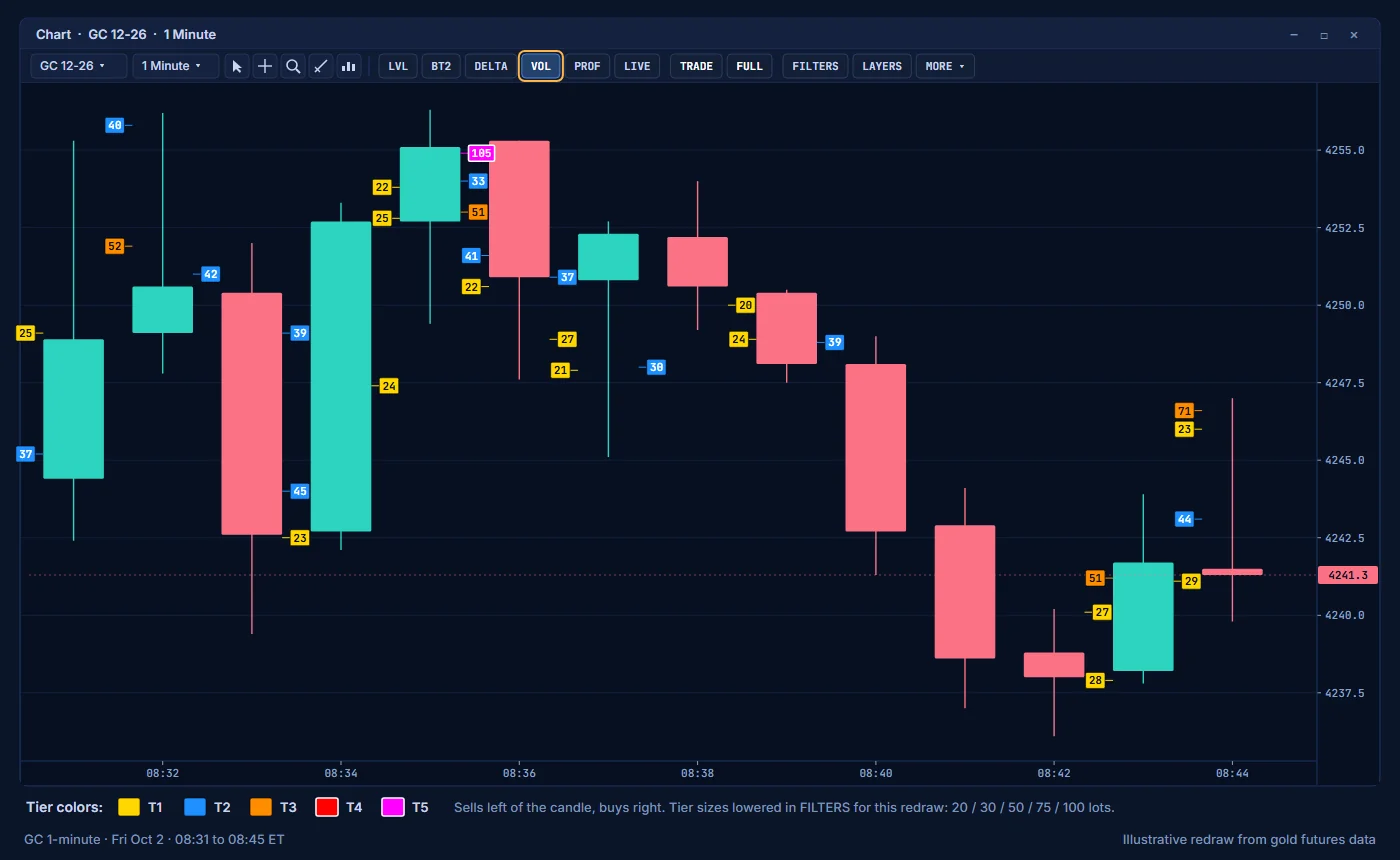
Turn the layer on or off with VOL on the toolbar.
What you see
- A small box beside the candle for each marked price.
- Buy volume boxes sit on the right of the candle. Sell volume boxes sit on the left.
- A thin connector line joins each box to its price.
- The volume in lots is printed in the box.
- A candle shows only a few marks, so the chart stays readable.
The five tiers
The box color tells you the size tier. These are the GC defaults:
| Tier | Color | GC default (lots) |
|---|---|---|
| Tier 1 | Gold | 70 |
| Tier 2 | Blue | 100 |
| Tier 3 | Dark orange | 200 |
| Tier 4 | Red | 300 |
| Tier 5 | Magenta | 400 |
Tier 4 and tier 5 boxes have a thicker border, so the largest volume stands out.
Note: Use Instrument Preset Volume Tiers is off by default, so the five Tier Minimum Volume values in group 03 are used. Turn it on to let your instrument preset supply the tiers. For display only, you can also set the tier sizes in the FILTERS window. A value of 0 there keeps the tier value from the settings.
How to read it
- Strong tiers at the top of an up move show where buyers were most active inside the candle. Strong tiers at the bottom of a down move show the same for sellers.
- Heavy buy volume at the high of a candle that then closes lower is worth noting. Aggressive buyers traded there, but price did not hold. Compare with delta and with the levels nearby.
- Large boxes at a level you watch show where the fight happened at that level.
- Read the filters with Delta: delta gives the candle's net result, the filters show where inside the candle the volume was.
Alerts
You can get a sound when a live candle prints volume in the strongest tiers. This alert is off by default. See Alerts.
Settings
| Setting | Group | Default |
|---|---|---|
| Candle volume filter marks | 00 Chart View | On |
| Show Candle Volume Filters | 03 Candle Volume Filters | On |
| Volume Filter Mode | 03 Candle Volume Filters | 0 Dominant Side |
| Use Instrument Preset Volume Tiers | 03 Candle Volume Filters | Off |
| Tier 1 to Tier 5 Minimum Volume | 03 Candle Volume Filters | 70, 100, 200, 300, 400 |
| Show Volume Numbers | 03 Candle Volume Filters | On |
| Enable Realtime Volume Alerts | 03 Candle Volume Filters | Off |
| Alert From Tier | 03 Candle Volume Filters | 4 |
| Alert Rearm Seconds | 03 Candle Volume Filters | 10 |
| Tier 1 to Tier 5 Color | 03 Candle Volume Filters | Gold, Dodger blue, Dark orange, Red, Magenta |
PreviousSession levels: Asia, London, overnight and New YorkNextMBO Price Map: the order book, order by order
Education only. Not financial advice. Trading futures and CFDs carries a high risk of loss.