Documentation menu
MBO Price Map: the order book, order by order
LayoutThe headerRows and order segmentsContext tagsBadgesData statesThe ladder panelSettings
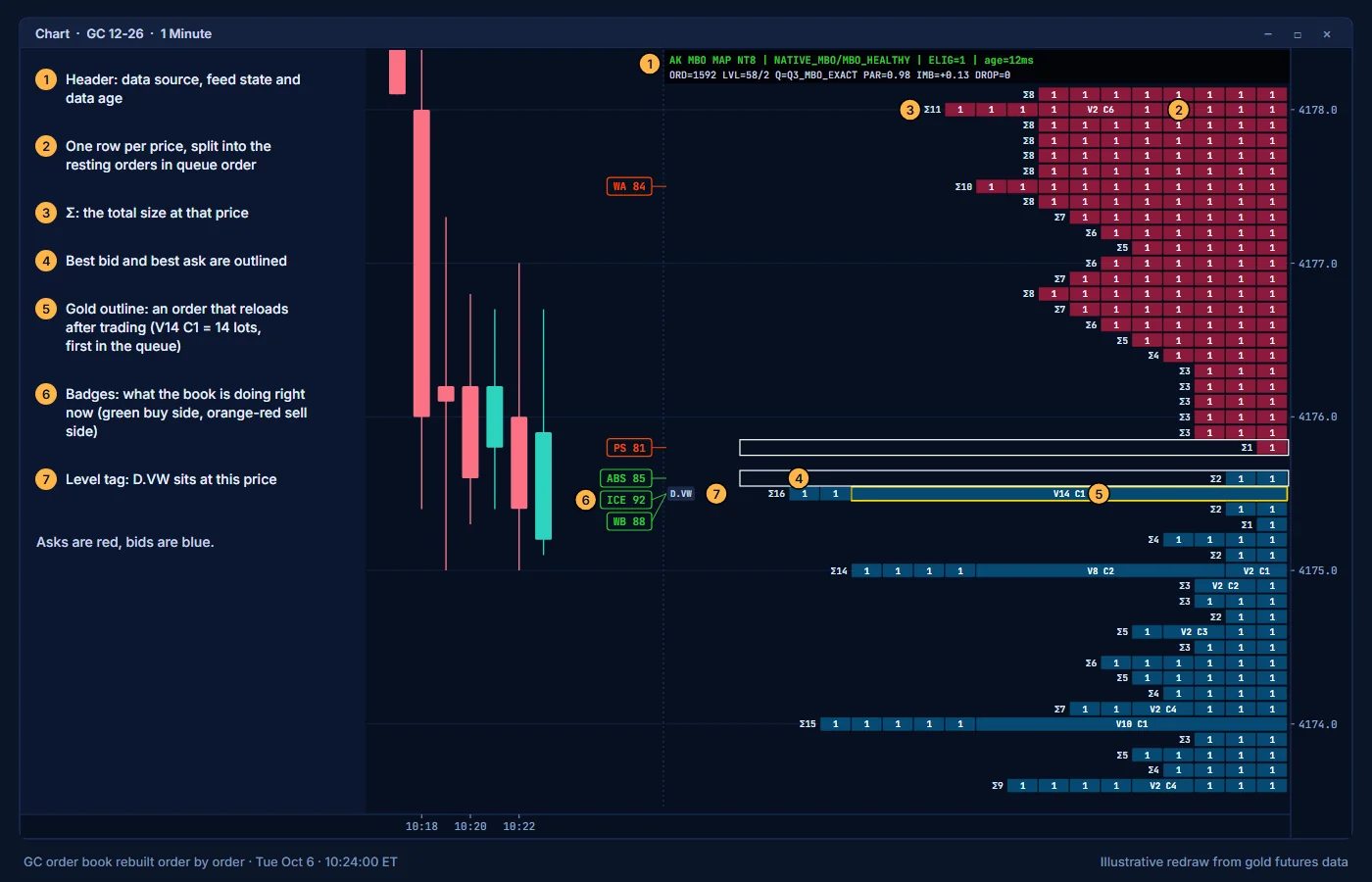
The MBO Price Map draws the order book on the right side of the chart, lined up with the price axis. Each row is one price. With order-by-order (MBO) data, each row is split into the individual resting orders at that price, in queue order.
MBO means market by order. A normal Level 2 book tells you the total size at each price. An MBO book tells you each order that makes up that total. One order of 50 lots and fifty orders of 1 lot look the same in Level 2. They look different in the map.
Turn the map on or off with DOM in the MORE list on the toolbar. MAP, also in MORE, opens the map window: the fast-market mode, which badges are shown and the STALE header tag.
Layout
- The map is anchored to the right edge of the chart. It is up to 620 px wide and never more than 55% of the chart width.
- It shows 60 price levels on each side of the market by default.
- Asks (sellers) are red. Bids (buyers) are blue.
- The best bid and best ask are outlined.
The header
The header line at the top of the map tells you where the data comes from and how good it is. It reads like AK MBO MAP NT8 | NATIVE_MBO/MBO_HEALTHY | ELIG=1 | age=12ms. The text is green when ELIG=1 and grey otherwise.
| Part | Meaning |
|---|---|
NATIVE_MBO | Order-by-order data from the Rithmic connection. Full detail. |
L2_FALLBACK | No MBO data. The map uses Level 2 totals per price. |
/MBO_HEALTHY | The state of the order-by-order feed. MBO_HEALTHY is the normal state. MBO_PARTIAL means data arrives but does not yet pass every quality check. MBO_STALE, MBO_BACKLOG and MBO_DEGRADED mean the feed is late or overloaded. MBO_WAITING_DATA and MBO_OFF mean no order-by-order data. |
ELIG=1 | The order-by-order data passed all quality checks: fresh, deep enough and matching the Level 2 book. ELIG=0 means the map still draws, but read the detail with care. |
age=12ms | Time since the last order-by-order update, in milliseconds. NA when there is none. |
STALE 3.4s | Added at the front when the book has not updated for longer than the STALE limit (2 seconds by default). The header turns orange-red and badges are hidden. |
STORM or STORM LIGHT | Added at the front during a burst of very fast trading. See Data states below. |
The stats line below it reads like ORD=812 LVL=58/2 Q=Q3_MBO_EXACT PAR=0.98 IMB=+0.12 DROP=0. In order: the number of resting orders, the price levels with order detail and with Level 2 totals only, the data quality class, how well the order detail matches the Level 2 totals (1.00 is a perfect match), the bid versus ask balance of resting size (positive means more on the bid), and the number of dropped updates.
Rows and order segments
With MBO data, each row is split into segments. Each segment is one resting order, in the order it sits in the queue.
- Each segment can carry a label such as
V40 C3: an order of 40 lots that is third in the queue at its price. Narrow segments show the size only. - Queue rank shows where an order sits in the line at its price. Orders at the front of the queue fill first.
- The total at each price is printed with a
Σin front, for exampleΣ123. - Size classes: orders of 20 lots or more are drawn as large, and orders of 50 lots or more as extreme, so they stand out.
- Iceberg and reload accent: orders that reload after trading are outlined in gold. See Icebergs.
- A row shows up to 24 individual orders.
How to read it: one thick order is one participant with size. Many small orders are crowd liquidity. Both can pull before price arrives, so watch what happens when price gets there.
Context tags
The map writes level names next to the rows they belong to, so you can see which level sits at which price in the book. Tags cover VWAPs and their ±σ bands, POC, VAH and VAL, HVN and LVN, previous and naked levels, day, week and month highs and lows, and the initial balance. A row shows up to 4 tags.
| Tag part | Meaning |
|---|---|
D, W, M | Day, week, month, for example D.POC |
P in front | Previous period, for example PD.VAH |
N: in front | Naked level, for example N:D.POC |
.VW | VWAP, for example W.VW |
.+1, .-1, .+2, .-2 | VWAP bands at ±1σ and ±2σ |
.HI, .LO | Period high and low, for example D.HI |
IB.H, IB.L | Initial balance high and low |
Several tags at one price are joined with /, for example D.POC/W.VW.
Badges
Badges are short codes to the left of the map that report what the book is doing right now. Each badge has a thin line to its price. The map shows up to 16 at a time, and none while the header shows STALE.
- A green badge is on the buy side. An orange-red badge is on the sell side.
- The number after the code is a strength score from 0 to 100, for example
ICE 92. ForB2the number is the order size in lots. ICE,WB,WAandB2point at their own price. The other badges point at the best bid (buy side) or the best ask (sell side).- Most badges describe the last few seconds of order book activity, so they come and go quickly.
| Badge | Meaning |
|---|---|
ICE | Iceberg: a resting order at this price kept refilling as it traded. |
SPF | Spoof-like behavior: a large order was placed and then cancelled quickly without trading. |
PS | Pull or stack: more size was added on one side, or pulled from the other. Buy side means bids were added or asks were pulled. |
VAC | Liquidity vacuum: one side of the book is much thinner than the other and is still being pulled. Buy side means the ask side is thin. |
ABS | Passive absorption: resting orders on one side took aggressive volume and refilled. Buy side means resting bids absorbed selling. |
QS | Queue sweep: aggressive orders traded through several prices in a short burst, clearing the queues on the way. |
STP | Stop chain: a fast run of aggressive trades through several prices in one direction, as when stop orders trigger one after another. |
BT | A big aggressive trade printed. |
B2 | A single aggressive order (BT2) of at least 20 lots printed in the last 3 seconds, at its first price. Live only, and it needs no MBO data. |
WB | Bid wall: the strongest resting size on the bid. |
WA | Ask wall: the strongest resting size on the ask. |
Badges describe what the book did. They are not instructions.
Data states
| State | What it means | What to do |
|---|---|---|
NATIVE_MBO | Full order-by-order data. | Nothing. |
L2_FALLBACK | Level 2 totals only. No order segments or icebergs. | Connect through Rithmic for MBO. |
REALTIME ONLY | The chart is still loading history and is not live yet. The map only draws from live depth. | Wait for the load to finish. Check that your data feed is connected and the market is open. |
WAITING_FOR_NATIVE_DEPTH | Live, but depth data has not arrived yet. | Wait a few seconds. If it stays, check your market depth access. |
STALE | The book has not updated for longer than the STALE limit (2 seconds by default). Badges are hidden. | Check your connection and computer load. A quiet market, such as the daily break, also shows it. |
STORM LIGHT | During a burst of very fast trading, fast-market protection draws the map in light mode: rows and totals only, redrawn a few times per second. | Nothing. Full detail returns when the market calms down. You can choose hidden, light or full in the MAP window. |
See Troubleshooting for more.
The ladder panel
AK FlowBook also includes an order book ladder panel (the MBO FlowBook ladder, settings group 04). By default, the MBO Price Map replaces it.
Settings
| Setting | Group | Default |
|---|---|---|
| DOM / MBO map | 00 Chart View | On |
| Show MBO Price Map (ATAS Chart Map) | 04B MBO Price Map (ATAS) | On |
| Map Width Pixels | 04B MBO Price Map (ATAS) | 620 |
| Maximum Chart Fraction | 04B MBO Price Map (ATAS) | 0.55 |
| Depth Levels Per Side | 04B MBO Price Map (ATAS) | 60 |
| Side Mode | 04B MBO Price Map (ATAS) | 0 Both |
| Large Order Lots | 04B1 Map Rows & Bars | 20 |
| Extreme Order Lots | 04B1 Map Rows & Bars | 50 |
| Segment Individual Orders | 04B2 Map Order Segments | On |
| Maximum Order Cells Per Level | 04B2 Map Order Segments | 24 |
| Show Queue Rank (V.. C..) | 04B2 Map Order Segments | On |
| Accent Iceberg / Reload Segments | 04B2 Map Order Segments | On |
| Show Important-Level Tags | 04B3 Map Context Tags | On |
| Show MBO Event Badges | 04B4 Map Event Badges | On |
| Maximum Event Badges | 04B4 Map Event Badges | 16 |
| Show Map Header | 04B5 Map Header & Fonts | On |
| Header: Show Statistics Line | 04B5 Map Header & Fonts | On |
| Map Font Family, Map Font Size | 04B5 Map Header & Fonts | Consolas, 8 |
| Allow L2 Fallback When MBO Is Unavailable | 04A Advanced MBO | On |
| Depth display levels per side (0 = auto preset) | Depth display | 500 |
| Map in a tick storm: 0 hide / 1 light / 2 full | Fast-market protection | 1 (light) |
| Map STALE after (ms) | Fast-market protection | 2000 |
Education only. Not financial advice. Trading futures and CFDs carries a high risk of loss.