Documentation menu
Alerts: setup, context and liquidity messages
Create the alertWhen alerts fireAlert groupsMessage formatsWebhooksTroubleshooting alerts
AK FlowBook Full sends all of its alerts through one TradingView alert. You choose which events are included in the indicator settings, then create a single alert on the chart.
Create the alert
- Open the chart with
AKFB Fullon it, on the symbol and timeframe you want to watch (for exampleOANDA:XAUUSD, 5 minutes). - Set up the alert groups you want in the indicator settings first (see below).
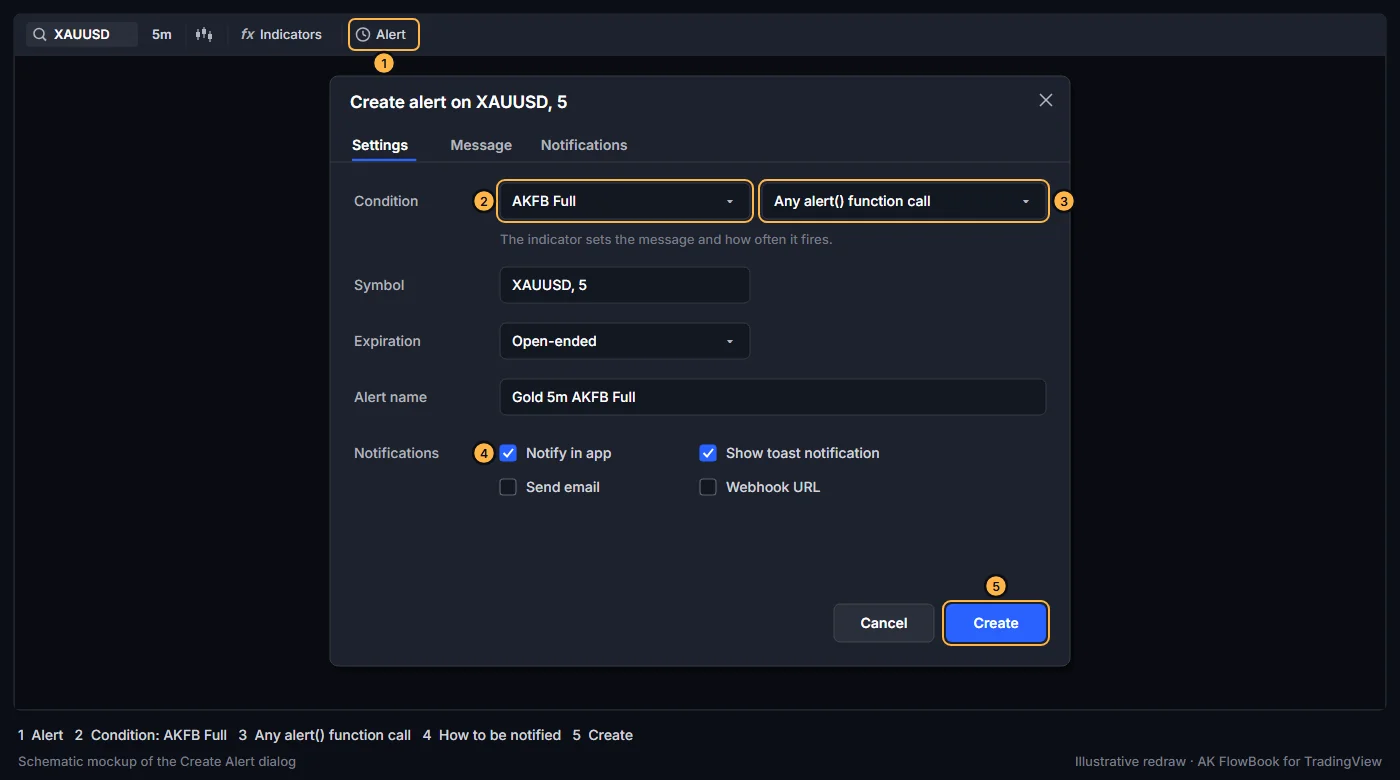
- Open Create Alert (the Alert button in the top toolbar, or right-click the chart and choose Add alert).
- In Condition, select AKFB Full, then Any alert() function call.
- Choose how you want to be notified (app, email, webhook and so on) and create the alert.
The indicator writes the message and sets how often it fires. You do not need to type a message.
When alerts fire
Trigger alerts only on bar close(default On): each message is sent once, when the bar closes. This avoids alerts for events that disappear before the close.- With it off, messages can be sent during the bar, at most once per bar, and an event can still change before the close. A sent alert cannot be recalled.
Enable unified runtime alerts(default On) is the master switch. With it off, the indicator sends no alerts at all.
If several events happen on the same bar, they are joined into one message, one event per line (or, for the liquidity layer, separated by | ).
Alert groups
| Group and switch | Default | Fires when |
|---|---|---|
Qualified setup decisions (Alerts group) | On | A setup context marker prints. With Elite filter also applies to setup alerts on, only for tiers you can see. |
Liquidity sweeps (Alerts group) | Off | A quality sweep of a recent high or low, or a sweep of an EQH/EQL pool with a close back. |
3-Drive PRZ (Alerts group) | Off | A new 3-Drive pattern is confirmed. |
Ichimoku TK crosses (Alerts group) | Off | Tenkan crosses Kijun. |
Alert: naked level touched (Naked Levels group) | Off | Price touches a naked level. |
Dynamic FLOWBOOK X alert() messages (FlowBook X group) | Off | A FlowBook X marker prints. |
alert(): LQ-S* / LQ-B* (liquidity layer) | On | An LQ-B* or LQ-S* label prints. |
alert(): chain momentum / accept (liquidity layer) | On | The origin chain reaches step 3 (3·MOM) or step 7 (7·ACC). |
Setup alerts and sweep alerts follow the same limits as the markers: XAUUSD/GC 5-minute only while Limit setup markers to XAU/GC 5-minute is on, and none in the news window. Liquidity-layer alerts need a 1- to 5-minute chart.
Message formats
Every message starts with AKFB Full |. <ticker> is the chart symbol, <TF> the chart timeframe in minutes, and <price> the bar's close, given for context.
Setup context
AKFB Full | <tier> <family> Long setup | <ticker> | <TF> | <price>AKFB Full | <tier> <family> Short setup | <ticker> | <TF> | <price>- Example:
AKFB Full | A+ VSR Long setup | XAUUSD | 5 | <price>
Context events
AKFB Full | BULL LIQUIDITY SWEEP | <ticker> | <TF>(andBEAR LIQUIDITY SWEEP)AKFB Full | BULL 3-DRIVE PRZ | <ticker> | <TF>(andBEAR 3-DRIVE PRZ)AKFB Full | BULL TK CROSS | <ticker> | <TF>(andBEAR TK CROSS)AKFB Full | nPOC TOUCH <price> | <ticker> | <TF>(alsonVAH,nVAL,nVWAP; the touched level's price)
FlowBook X
AKFB Full | FLOWBOOK X Long setup | <ticker> <TF> @ <price> | <R, H or R+H> | <level> | <flow>- Example:
AKFB Full | FLOWBOOK X Short setup | XAUUSD 5 @ <price> | R | D VAH | CVD DELTA
Liquidity layer
One message per bar, starting with AKFB Full | Liquidity layer, followed by one or more parts:
| LQ-B* <ticker> <TF> Long setup context(orLQ-S*, andLQ-B/LQ-Swithout a star if those are shown)| 3·MOM Long setup context <ticker> @ <price>(or Short)| 7·ACC Long setup context <ticker> @ <price>(or Short)- Example:
AKFB Full | Liquidity layer | LQ-S* XAUUSD 5 Short setup context | 3·MOM Short setup context XAUUSD @ <price>
Webhooks
If you send alerts to a webhook, parse on the AKFB Full | prefix and the | separators. Messages that combine several events on one bar contain line breaks.
Troubleshooting alerts
- No alerts arrive: check
Enable unified runtime alerts, the group switch, the chart timeframe and symbol limits above, and that the alert condition is Any alert() function call. - Old message text: the alert was created on an older version or older settings. Recreate it.
- Too many messages: turn off groups you do not need, or keep
Trigger alerts only on bar closeon.
Education only. Not financial advice. Trading futures and CFDs carries a high risk of loss.