Documentation menu
Setup context: AK score labels, long and short
What the label looks likeWhere it runsWhat the engine checksFamiliesConfirmation modeTiersSpacing and edge lockHow to use itSettings
The setup engine in AK FlowBook Full marks closed bars where several independent conditions line up at a reference level. The chart label shows a confluence score, for example AK 87. The dashboard names the side and the family, for example VSR LONG SETUP.
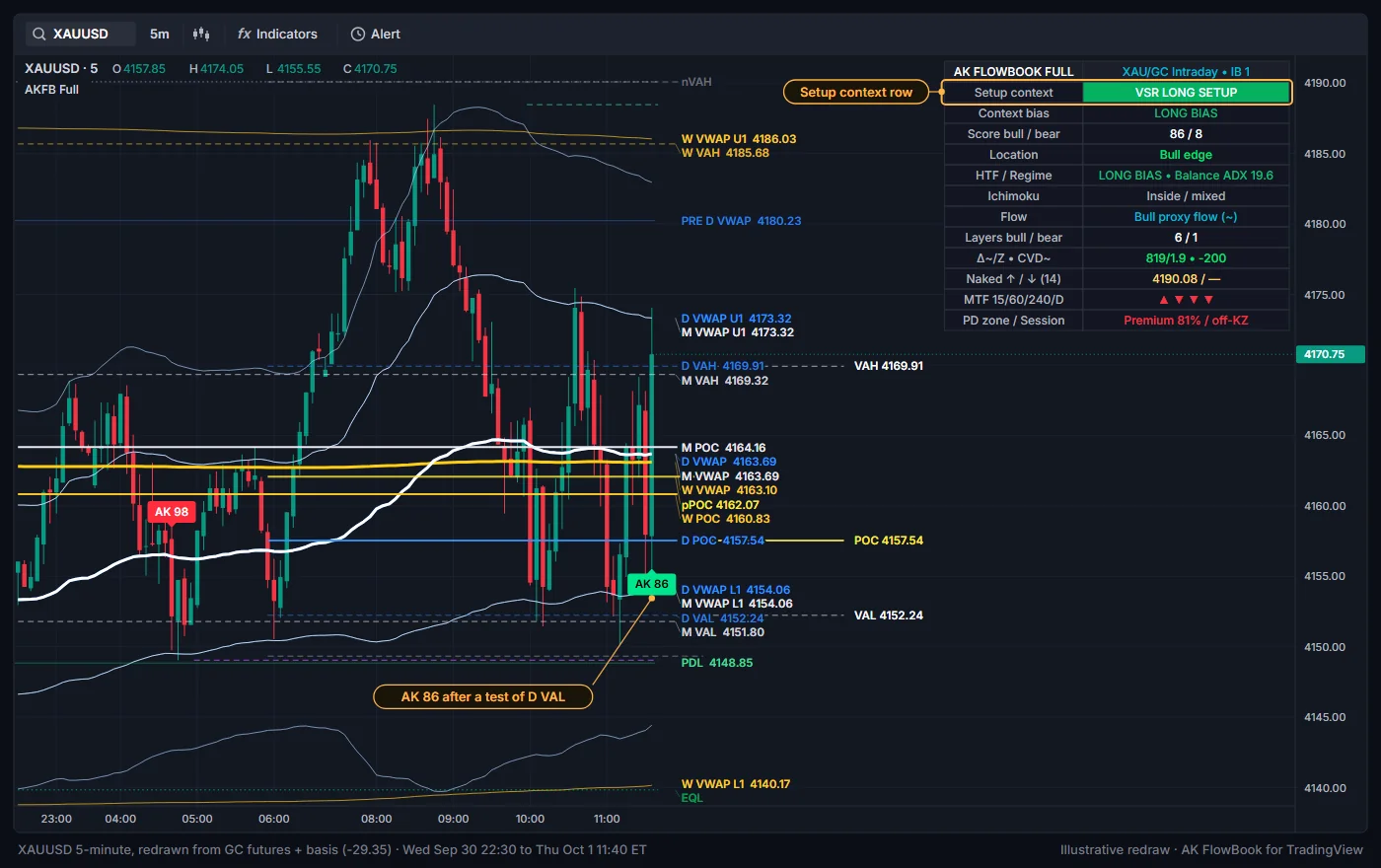
What the label looks like
| Label | Placement and color | Meaning |
|---|---|---|
AK <score> below the bar | Green (bright green for tier A+) | Long setup context: conditions lined up for a reaction up from a lower level. |
AK <score> above the bar | Red (bright red for tier A+) | Short setup context: conditions lined up for a reaction down from an upper level. |
The number is the confluence score from 0 to 100. The dashboard row Setup context shows the family and side on the same bar, for example MIT SHORT SETUP. Alerts use the words Long setup and Short setup.
Where it runs
By default, setup context markers appear only when all of these are true:
- the chart is XAUUSD or GC on a standard 5-minute timeframe (
Limit setup markers to XAU/GC 5-minute), - the bar has closed (
Confirm on bar close), - the bar is outside the news window (
News blackout (UTC), default Friday 12:00 to 14:00 UTC), - with
Use session filteron, the bar is insideSession 1orSession 2, - in Elite marker mode, the setup reaches tier
A+(see Tiers below).
When the chart is outside the XAU/GC 5-minute scope, the dashboard header reads CHECK XAU/GC • 5m.
What the engine checks
The engine follows a fixed order: location, then a trigger that arms a setup, then a reaction, then scoring. Conceptually:
- Location. Price touches a reference level within the edge tolerance. Lower levels for long context: a naked level below, the developing VAL, the prior POC from above, a lower band 1 of the D/W/M VWAP, the prior day, week or month low, a previous-period VWAP from above, or an active zone (FVG, order block, breaker, imbalance zone, 3-Drive PRZ). Upper levels mirror these for short context.
- Trigger (arming). At that level, one of these must happen: a first return to the level after price traveled away from the daily and weekly bands, a liquidity sweep, a swing failure, or a zone touch. The setup is now armed. The dashboard shows it, for example
FRR ARMED LONG. - Reaction. Within
Setup confirmation window (bars)(8), a later bar must show a reaction: a strong close or a close beyond the previous bar, a reclaim of a daily or weekly band or the prior day high or low, a sweep or a swing failure. If price closes clearly beyond the setup's extreme first, the setup is cancelled. - Supporting context. The score adds points for agreeing conditions and subtracts for opposing ones: the flow estimates, market structure, the higher-timeframe trend, several levels clustered together, a first return, a zone, a naked level, Ichimoku, multi-timeframe alignment and premium/discount.
- Layers. Separately, the engine counts how many independent layers agree (setup, reaction, flow, structure, higher-timeframe trend, a cluster of levels, Ichimoku), up to 7.
- Gate. The marker prints only when the score reaches the minimum (
Minimum decision score, and the family minimum below), the layer count reachesMinimum independent layers(3), the confirmation mode is satisfied, the family's own sequence is complete, and the opposite side is not qualifying on the same bar.
The exact weights are internal. The visible settings let you make the engine stricter or looser.
Families
Each setup belongs to one family, chosen by what armed it:
| Family | Armed by | Family minimum score (default) |
|---|---|---|
3DP | Price at a 3-Drive pattern zone | 82 |
MIT | Price inside an FVG, order block, imbalance zone or breaker | 74 |
VSR | A liquidity sweep or swing failure at a level | 68 |
FRR | A first return to a level, without a sweep or zone | 70 |
The VSR switch title describes it as a VWAP sweep / reclaim reversal, but VSR covers a sweep or swing failure at any of the levels above, not only VWAP. The four family switches are the first four settings in the Qualified Setup Families group; each title starts with the family code.
Confirmation mode
Confirmation mode (default Standard):
- Fast: a reaction is enough.
- Standard: reaction plus flow or structure (flow counts only if
Use proxy flow in setup qualificationis on). - Strict: reaction plus flow plus structure, with the higher-timeframe trend and Ichimoku not opposed.
Require rejection / reclaim (on) additionally needs a rejection candle, a reclaim, a sweep or a swing failure.
Tiers
| Tier | Rule |
|---|---|
A+ | Score at least A+ minimum score (85), layers at least A+ minimum layers (5), flow and structure agree, higher-timeframe trend not opposed. |
A | Score clearly above the minimum decision score, without meeting every A+ condition. |
B | Everything else that passed the gate. |
In Elite marker mode only A+ is drawn (add A with Elite also shows tier-A setups). In Normal or All mode every tier is drawn. The tier appears in the alert text, for example A+ VSR Long setup.
Spacing and edge lock
Same-side marker spacing(3) andMinimum spacing between all setups(5) keep markers from bunching up.Block duplicate setups on consumed edge(on) andMaximum setups per edge visit(1) allow one marker per visit to a level. The level is released once price movesEdge re-arm distance (ATR)(0.65) away.Allow immediate setup at a different edge(on) lets a genuinely new level produce a marker right away.
How to use it
- Treat the marker as a prompt to look, not as a decision. Ask: which level is this, what do the flow estimates show, where is price in the day's value, and what is the higher-timeframe context?
- Read the dashboard on that bar:
Location,Score bull / bear,Layers bull / bearandFlowshow why the engine fired. - Markers can appear in conditions that then fail. A higher score means more conditions agreed, not a higher chance of anything.
Settings
| Setting | Default | What it does |
|---|---|---|
Show qualified setup markers | On | Draws setup context markers. |
AK Setup markers (Long / Short setup) | On | Second display switch for the same markers (Event Markers group). |
Limit setup markers to XAU/GC 5-minute | On | Limits markers and setup alerts to XAUUSD/GC 5-minute charts. |
Enable setup engine | On | Runs the engine. |
Confirmation mode | Standard | Fast, Standard or Strict. |
Minimum decision score | 68 | Lowest accepted score. Set by the market preset unless Manual. |
Minimum independent layers | 3 | Lowest accepted layer count. |
Require rejection / reclaim | On | Needs a rejection, reclaim, sweep or swing failure. |
Same-side marker spacing | 3 | Minimum bars between markers on the same side. |
Setup confirmation window (bars) | 8 | Bars allowed between arming and reaction. |
Minimum spacing between all setups | 5 | Minimum bars between any two markers. |
Block duplicate setups on consumed edge | On | One marker per level visit. |
Maximum setups per edge visit | 1 | Markers allowed per level visit (1 to 3). |
Edge re-arm distance (ATR) | 0.65 | Distance price must travel before a used level can fire again. |
Allow immediate setup at a different edge | On | Lets a new level fire without waiting. |
Edge tolerance (ATR) | 0.18 | How close counts as a touch. Set by the market preset unless Manual. |
Level cluster distance (ATR) | 0.28 | How close levels must be to form a cluster. Set by the market preset unless Manual. |
First-return arm distance (ATR) | 0.80 | How far price must travel from the bands before a return counts as first. |
Family switches (VSR, MIT, 3DP, FRR) | On | Turn each family on or off. |
VSR minimum score, MIT minimum score, 3DP minimum score, FRR minimum score | 68, 74, 82, 70 | Minimum score per family. |
A+ minimum score | 85 | Score needed for tier A+. |
A+ minimum layers | 5 | Layers needed for tier A+. |
Elite also shows tier-A setups | Off | Shows tier A in Elite mode. |
Elite filter also applies to setup alerts | On | Alerts only for tiers you can see. |
Use session filter | Off | Limits markers to Session 1 (0700-1100) and Session 2 (1330-1700), exchange time. |
News blackout (UTC) with Fridays only | On, 1200-1400, Fridays | No new markers or setup alerts in the window. |
Related settings that feed the engine: Use proxy flow in setup qualification, Use POC / VA edges in setup engine, Use naked levels in setup engine, Use Ichimoku in context score, Use MTF alignment in score, Use PD location in score (long in discount, short in premium). See the Settings reference.
Education only. Not financial advice. Trading futures and CFDs carries a high risk of loss.