Documentation menu
Sessions and killzones
Gold trades almost around the clock, but activity clusters in a few windows. AK FlowBook tracks the high and low of each session window and leaves them on the chart until price takes them out.
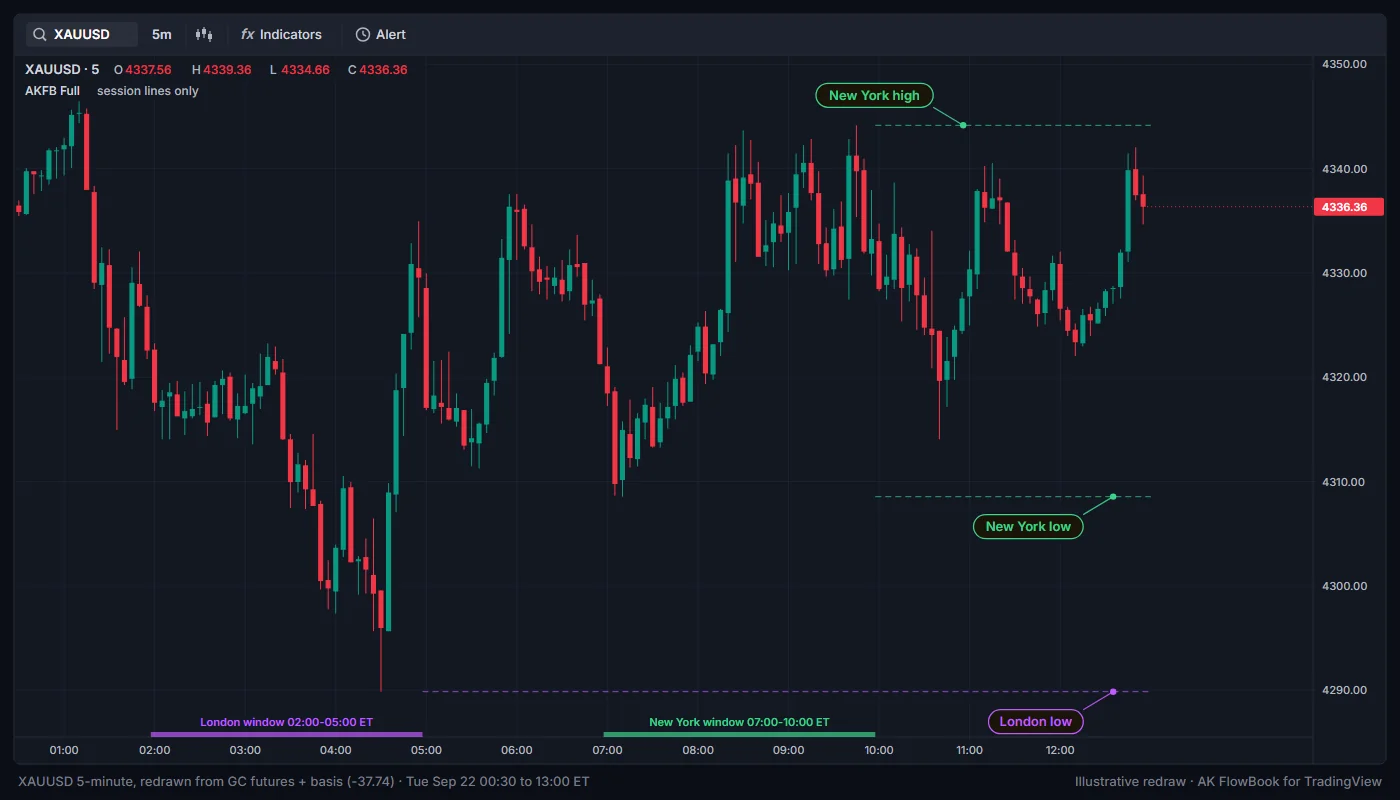
Default windows
All windows use the time zone in Timezone (default America/New_York).
| Session | Default window (New York time) | On by default | Color |
|---|---|---|---|
Asia (ASIA) | 20:00 to 00:00 | No | Blue |
London (LDN) | 02:00 to 05:00 | Yes | Purple |
New York (NY) | 07:00 to 10:00 | Yes | Green |
You can change each window and turn each one on or off. If you change Timezone, enter the windows in that time zone.
What is drawn
- Session high and low lines (
Session H/L lines until swept, on): when a session window ends, its high and low become dashed lines in the session color. Each line extends right until price trades through it, then it is removed. The last three sessions of each type are kept. The lines have no text. - Session boxes (
Show killzone boxes, off): a shaded box over each window with the nameASIA,LDNorNY. - Dashboard: the
PD zone / Sessionrow shows which window is active now (NY,LDN,ASIAoroff-KZ). See Dashboard.
How to read it
- An untaken session high or low is a visible place where stops may rest. When the New York session trades through the London high, for example, that liquidity is taken and the line disappears.
- Combine with the liquidity layer: a session extreme that lines up with an
EQH/EQLline or aMAJ15-minute level is a stronger reference than either alone.
Three clocks in one indicator
AK FlowBook Full uses different clocks for different features. Keep this in mind when you compare times:
| Feature | Clock |
|---|---|
| Session windows (killzones) | Timezone setting, default America/New_York |
News window (News blackout (UTC)) | UTC |
Take marks (x HH:mm) | UTC |
Session 1 and Session 2 of the optional setup session filter | The chart symbol's exchange time zone |
Settings
| Setting | Default | What it does |
|---|---|---|
Show killzone boxes | Off | Draws a box over each active session window. |
Session H/L lines until swept | On | Draws each finished session's high and low until price trades through. |
Timezone | America/New_York | Time zone for all three windows. |
Asia | Off, 2000-0000 | Asia window and switch. |
London | On, 0200-0500 | London window and switch. |
New York | On, 0700-1000 | New York window and switch. |
The setup engine also has an optional time filter (Use session filter, Session 1, Session 2). It only limits when setup context markers can appear and does not draw anything. See Setup context.
Education only. Not financial advice. Trading futures and CFDs carries a high risk of loss.