Documentation menu
Get access to AK FlowBook Lite and Full
Lite: free for followersAdd the indicator to your chartIf you do not see it yetFull: coming soonGood to know
Both builds of AK FlowBook are invite-only TradingView scripts. There is no code to copy or paste. We add access to your TradingView username, and the indicator then appears in your TradingView account.
Lite: free for followers
- Follow @akorderflow on Instagram.
- Send us the word
LITEin a direct message (open a DM). - When we reply, send your TradingView username.
We add access to your account within 24 hours. You can also join our Telegram channel for updates and the daily gold levels. That step is optional.
You can see the public page of the script on TradingView here: AK FlowBook Lite on TradingView.
Add the indicator to your chart
- Log in to TradingView with the username you sent us.
- Open any chart.
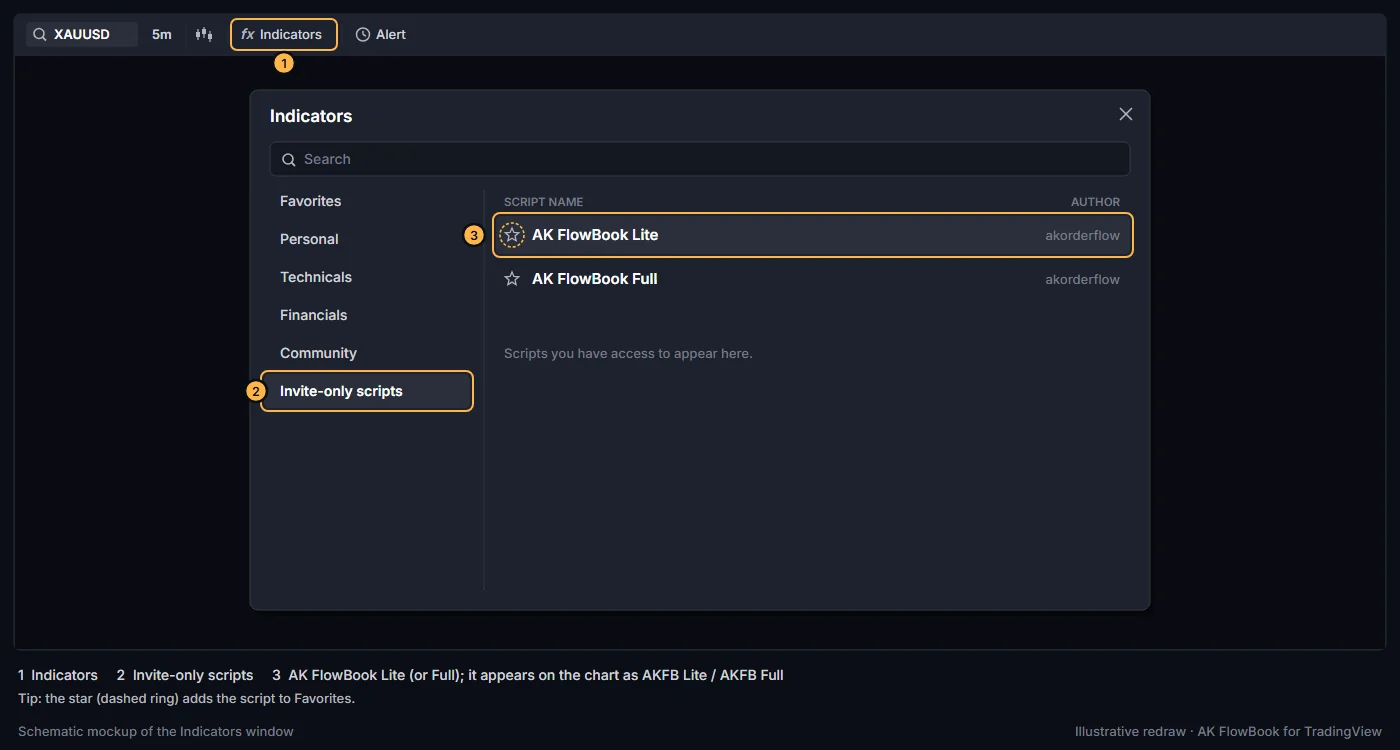
- Click Indicators in the top toolbar.
- Open the Invite-only scripts section of the Indicators window.
- Click AK FlowBook Lite (or AK FlowBook Full once you have it). It appears on the chart as
AKFB LiteorAKFB Full.
If you do not see it yet
- Wait a few minutes after we confirm. TradingView sometimes needs a moment to update access.
- Refresh the page, or log out of TradingView and log back in.
- Check that you sent your username, not your display name or email.
- Still nothing after 24 hours? Send us a DM again with your username.
Full: coming soon
AK FlowBook Full is not on sale yet. It adds setup context markers, the FlowBook X confluence marker, a 15-minute liquidity layer, Ichimoku context and the 3-Drive pattern zone on top of everything in Lite. See the comparison table.
- Join the waitlist on our TradingView page. We announce the launch and the price there and on Telegram.
- Full is also invite-only. After purchase you send your TradingView username and we add access to your account, the same way as Lite.
Good to know
- Access is tied to your TradingView account. The source code is protected, so you cannot view or copy it.
- We never ask for your TradingView password. Only your username.
- When we publish an update, TradingView serves the new version of the script. If you do not see new settings, remove the indicator and add it again. Recreate any alerts you made on an older version (see Alerts).
Next: Quick start or, for Lite, the AK FlowBook Lite guide.
Education only. Not financial advice. Trading futures and CFDs carries a high risk of loss.