Documentation menu
Liquidity: pools, sweeps and 15-minute levels
EQH and EQL poolsLQ sweep markersSFP swing failuresThe 15-minute liquidity layerHow to read liquiditySettings
Liquidity tools show where resting orders and stops are likely to sit (above swing highs, below swing lows, at equal highs and lows) and mark when price runs through those prices and comes back. AK FlowBook Full has two sets of tools:
- Chart liquidity:
EQH/EQLpools,LQsweep markers andSFPswing failures, built on your chart timeframe. - The 15-minute liquidity layer: ranked 15-minute swing levels, take marks and
SWPsweep marks. It works on 1- to 5-minute charts only.
What happens after a sweep (the LQ-B*/LQ-S* labels and the origin chain) is covered in Liquidity sequences.
EQH and EQL pools
When a new confirmed swing high forms within Equal H/L tolerance (ATR) (0.15 ATR) of the previous swing high, and the two are not too far apart in time, the indicator draws an EQH line at the higher of the two. EQL is the mirror for swing lows.
- Drawn as a dotted line with a small
EQH(red) orEQL(green) label, extending right. - The line disappears as soon as price trades through it. That is the moment the liquidity resting there was taken.
- Shown by default in every marker mode.
Equal highs and lows attract attention because many traders place stops just beyond them.
LQ sweep markers
An LQ marker (small circle) appears when a bar trades below the lowest low of recent bars (Sweep lookback) and closes back above it, with enough volume, a long enough wick and a deep enough close back (green circle below the bar). The mirror above recent highs gives a red circle above the bar.
- Off by default (
LQ Liquidity sweepsin the Event Markers group) and hidden in Elite marker mode. - Spaced by
Sweep marker spacing(6 bars). - Fixed at bar close, and hidden on non-gold or non-5-minute charts while
Limit setup markers to XAU/GC 5-minuteis on.
The quality conditions come from Sweep minimum volume Z (quality), Sweep minimum wick (ATR, quality) and Sweep reclaim depth. These settings also affect the setup engine, not only the marker.
LQ sweep marker and the LQ-B*/LQ-S* labels are two different features. LQ is a chart-timeframe sweep marker. LQ-B*/LQ-S* come from the 15-minute liquidity layer.SFP swing failures
An SFP label appears when price trades beyond the last confirmed swing high or low and closes back inside it, with a wick of at least SFP minimum wick (ATR) and volume above SFP minimum volume Z. Green label below the bar for a failed break lower, red label above for a failed break higher. Off by default (SFP swing failure), hidden in Elite mode, and limited by the same bar-close and XAU/GC rules as LQ.
The 15-minute liquidity layer
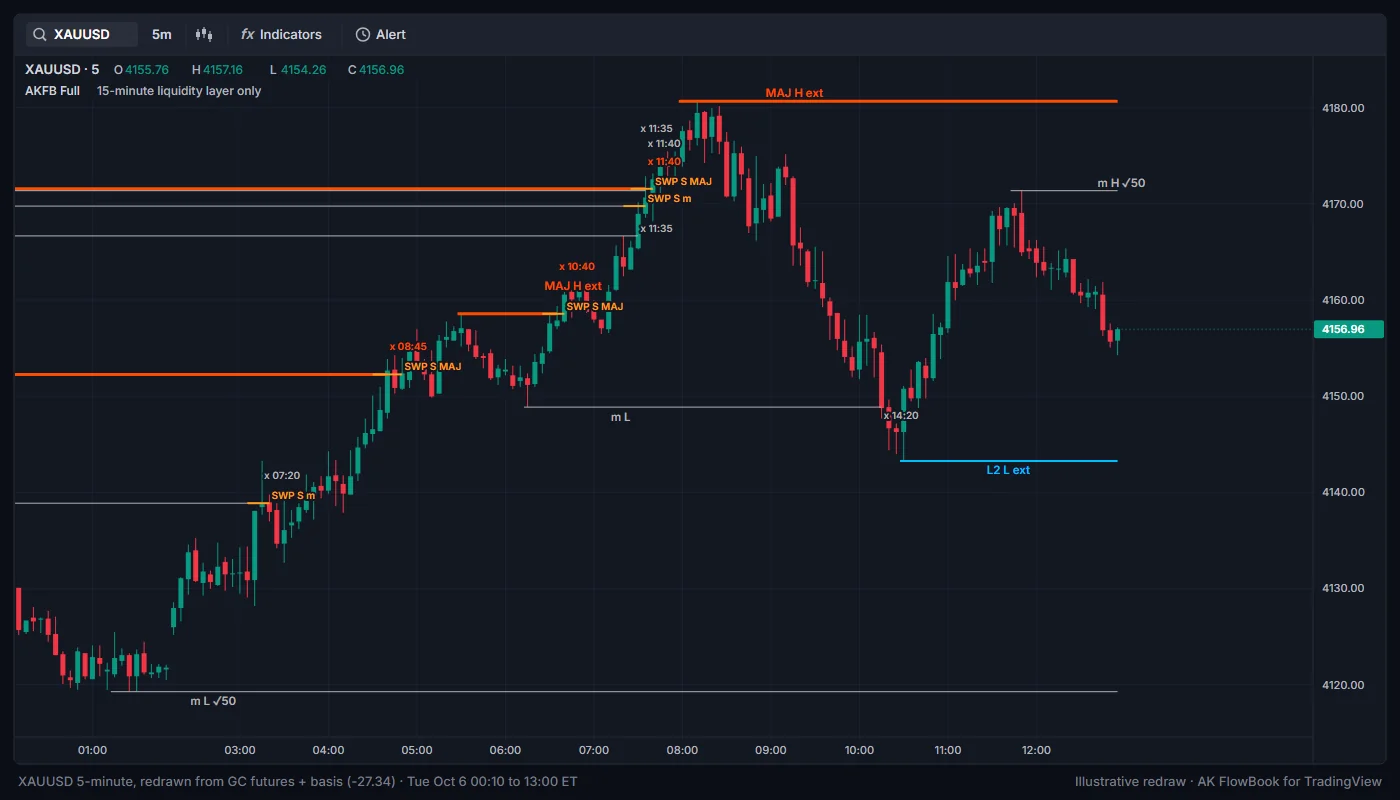
This layer reads closed 15-minute candles and draws the swing highs and lows of the 15-minute chart on your 1- to 5-minute chart.
Enable origin-TF liquidity layer is on. On other timeframes it draws nothing. It uses price and bar volume only.Level classes
A 15-minute candle is a swing high when its high stands above the candles on both sides of it (swing low is the mirror). A swing is confirmed only after the candles that follow it have closed, so levels appear with a short delay. Each swing is ranked:
| Class | Meaning | Line |
|---|---|---|
MAJ | The highest high (or lowest low) over a long stretch of recent 15-minute candles | Orange-red, thickest |
L2 | The highest high (or lowest low) over a medium stretch | Blue, medium |
m | A minor swing | Grey, thin |
The label is placed where the swing is confirmed, for example MAJ H, L2 L or m H (H = high, L = low). It can carry a flag:
✓50: the swing formed between the middle and the far end of the last leg (a pullback of about half the leg).ext: the swing extends beyond the previous swing on the same side.
Untaken levels extend to the last bar. A limited number of recent levels per class is kept.
Take marks
When a later bar trades through a level by at least one tick (Tick unit (price)), the line stops at that bar and a small x HH:mm mark shows the time in UTC, for example x 14:35. That is when the liquidity at that level was taken.
SWP sweep marks
If price closes back inside the level on the take bar or within the next couple of bars, the indicator marks a sweep:
SWP B <class>(cyan): a low was taken and price closed back above it.SWP S <class>(orange): a high was taken and price closed back below it.<class>ism,L2orMAJ. WithInclude 1m-pivot sweeps in the markson, sweeps of chart-timeframe swing points are added with class1m. Despite the name, these are swings on your chart timeframe, so on a 5-minute chart they are 5-minute swings.
A short thick line marks the swept level around the take.
Drawing window
Liquidity-layer drawings appear only in the last Draw marks in the last N bars bars (2,000 by default). Older history is calculated but not drawn, to save drawing space.
How to read liquidity
- A level that is still untaken is a place where stops and resting orders may still sit.
- A take (
x) followed by a close back inside (SWP) means the move through the level did not hold on a closing basis. Whether that matters depends on location and on what volume and the next bars do. MAJlevels cover a larger stretch of time thanmlevels, so more traders tend to watch them.- Combine with the map: a
MAJ Lsweep at the weekly VAL is a different picture from anm Lsweep in the middle of the day's range.
Settings
| Setting | Default | What it does |
|---|---|---|
Detect EQH / EQL liquidity pools | On | Draws EQH and EQL lines. |
Equal H/L tolerance (ATR) | 0.15 | How close two swings must be to count as equal. |
Liquidity sweep engine | On | Detects chart sweeps (feeds LQ, sweep alerts and the setup engine). |
Show sweep markers | On | Allows LQ markers (also needs LQ Liquidity sweeps). |
Sweep lookback | 20 | Bars back for the prior high or low. Set by the market preset unless Manual. |
Sweep minimum volume Z (quality) | 0.80 | Volume needed for a quality sweep. |
Sweep minimum wick (ATR, quality) | 0.12 | Wick needed for a quality sweep. |
Sweep reclaim depth | 0.25 | How far back the close must reach, as a share of the penetration. |
Sweep marker spacing | 6 | Minimum bars between LQ markers on the same side. |
Show SFP events | On | Allows SFP labels (also needs SFP swing failure). |
SFP minimum wick (ATR) | 0.20 | Wick needed for an SFP. |
SFP minimum volume Z | 0.70 | Volume needed for an SFP. |
Enable origin-TF liquidity layer | On | Runs the 15-minute layer on 1- to 5-minute charts. |
Tick unit (price) | 0.10 | Price step used for takes and sweeps. Keep 0.10 for gold. |
Draw marks in the last N bars | 2000 | Drawing window for the layer. |
15m levels: m, L2, MAJ | On | Which level classes to draw. |
Taken marks (x hh:mm UTC) | On | Shows take marks. |
Sweep marks (SWP B / S) | On | Shows SWP marks. |
Include 1m-pivot sweeps in the marks | Off | Adds chart-timeframe swing sweeps (class 1m). |
Education only. Not financial advice. Trading futures and CFDs carries a high risk of loss.