Documentation menu
AK FlowBook for TradingView: overview
What it is, and what it is notFull vs LiteWhere to startChart componentsSettings and helpWant real order flow?
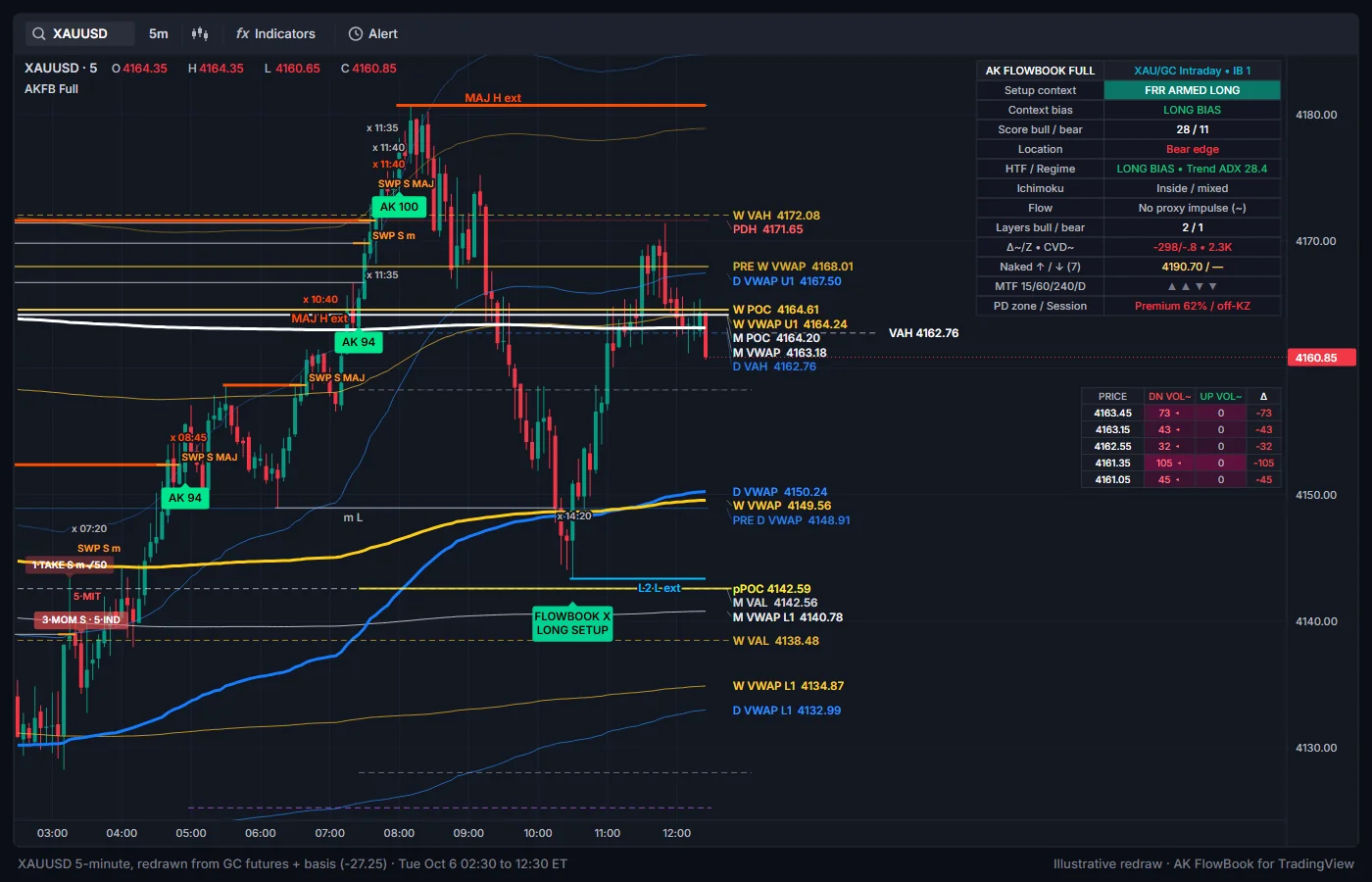
AK FlowBook for TradingView puts the levels and context we use on gold onto your own TradingView chart: daily, weekly and monthly VWAP, volume profile levels, naked levels, liquidity, sessions and order-flow estimates built from 1-minute intrabars. It comes in two builds:
- AK FlowBook Lite (
AKFB Liteon the chart): free for our followers. The full context map with no setup labels. - AK FlowBook Full (
AKFB Fullon the chart): invite-only, coming soon. Everything in Lite plus setup context, the FlowBook X confluence marker and a 15-minute liquidity layer.
Both were built and tuned on gold (XAUUSD and GC futures) on intraday charts. The levels work on any symbol that has volume.
What it is, and what it is not
- It is a chart-analysis and education tool. It shows where volume traded, where the reference levels are, and how price behaves around them.
- It does not tell you to buy or sell. It does not give stops, targets or position sizes, and it does not place trades.
- The Full build can mark bars where several conditions line up at a level (an
AKscore label, shown as long setup or short setup context on the dashboard). That is context for your own analysis, not an instruction. See Setup context.
~.Full vs Lite
| Feature | Lite | Full |
|---|---|---|
| Price and access | Free for followers, invite-only | Coming soon, invite-only (waitlist open) |
| D/W/M VWAP with 1σ and 2σ bands | Yes | Yes |
| Previous D/W/M VWAP, prior day/week/month high and low | Yes | Yes |
| Right-side level labels with prices | Yes | Yes |
| D/W/M volume profiles (POC, VAH, VAL) and optional histogram | Yes | Yes |
| Naked levels (nPOC, nVAH, nVAL, nVWAP) | Yes | Yes |
| Flow estimates: D~, BV~, A~, CVD~, Δ÷, EXH, large volume chunks | Yes | Yes |
| Stacked imbalance | Zones plus IMB~ marker | Zones (boxes optional) |
| Developing-bar footprint panel | Yes | Yes |
| EQH/EQL pools, LQ sweeps, SFP swing failures | Yes | Yes |
| BOS and CHoCH markers | Yes | No (structure is used internally) |
| FVG, order blocks, breaker blocks | Yes | Yes |
| Session high/low lines and killzone boxes | Yes | Yes |
| Higher-timeframe trend and MTF arrows | Yes | Yes, plus regime text |
| Ichimoku context and TK crosses | No | Yes |
| 3-Drive pattern zone (PRZ) | No | Yes |
Setup context markers (AK score labels, long or short setup context) | No | Yes |
| FlowBook X confluence marker, R/H divergence markers | No | Yes |
15-minute liquidity levels, SWP sweeps, LQ-B*/LQ-S*, origin chain | No | Yes |
| News window (no new labels in a set UTC window) | No | Yes |
| Dashboard | Context dashboard | Extended dashboard with score and layers |
| Alerts | Context alerts | Context, setup context, FlowBook X and liquidity-layer alerts |
Where to start
- Get access: how to get Lite for free and join the Full waitlist.
- Quick start: the recommended chart and the first five things to check.
- Dashboard: what every row means.
- Your first session: a simple routine for one gold session.
Using Lite? Go straight to the AK FlowBook Lite guide.
Chart components
- VWAP map: daily, weekly and monthly VWAP, bands, previous VWAP, prior highs and lows.
- Volume profiles: POC, VAH and VAL for the day, week and month.
- Naked levels: prior levels price has not revisited.
- Intrabar flow estimates: D~, BV~, A~, CVD~, Δ÷, EXH, imbalance and volume chunks.
- Footprint panel: the developing bar by price.
- Liquidity: EQH/EQL, sweeps, swing failures and 15-minute levels.
- Liquidity sequences:
LQ-B*,LQ-S*and the origin chain. - Structure zones: FVG, order blocks, breakers and the 3-Drive zone.
- Sessions: Asia, London and New York.
- Higher-timeframe context: HTF trend, MTF arrows, regime, Ichimoku, premium/discount.
- Setup context: what the
AKscore labels and long or short setup context mean. - FlowBook X: the confluence marker.
Settings and help
- Market presets, Display and marker modes, Alerts and the full Settings reference.
- Troubleshooting and FAQ.
Want real order flow?
TradingView cannot show the real order book. For exchange data (every order added, cancelled and filled, big trades and icebergs) see AK FlowBook for NinjaTrader and its documentation. You can also see the same kinds of levels built from real gold futures volume on our live gold page.
Education only. Not financial advice. Trading futures and CFDs carries a high risk of loss.